概述
前两节学习过了字节输入流和字节输出流,大家可能会疑惑,为什么已经有了字节输入流,还需要字符输入流。其实从字面意思就可以理解,字节输入流在读取的时候是按字节的方式,而字节是一个对计算机友好,但是对人类用户不友好的方式,字符才是对人类友好的传递信息的方式。字符流对处理文字特别方便,而字节流在处理图像、音频、视频方面比较方便。
Reader的继承结构
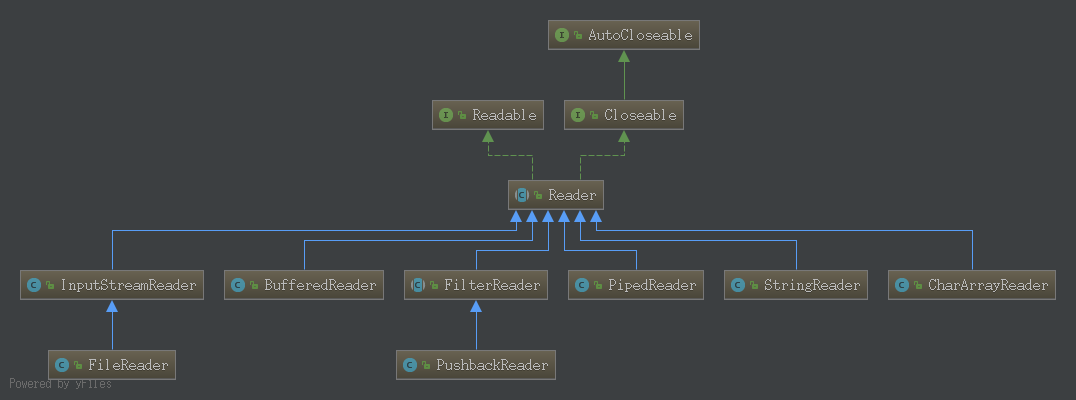
字符流和字节流的区别
字符流是用两字节表示Unicode编码,和FileInputStream返回的read方法返回的一样是int,但是两个的含义是不一样的。FileInputStream返回的是一个8位字节表示的10进制编码,范围是-128~127,而FileReader因为返回的是2个字节的Unicode10进制编码,范围是-1~65535。比如用FileReader读取文件,调用read方法读“你”,返回的是20320。在Unicode编码中20320代表的就是中文的“你”。
StreamDecoder
在介绍Reader之前先介绍一个工具类StreamDecoder,StreamDecoder是讲字节流转换为字符流的工具,因为字节转换为字符流转换为需要写入字节的编码方式解码才能正确的解析为字符。
StreamDecoder构造函数
1
2
3
4
5
6
7
8
9
10
11
12
13
14
//设置需要转换的InputStream,以及通过设置编码名来解码输入流字节
public static StreamDecoder forInputStreamReader(InputStream in,
Object lock,
String charsetName)
throws UnsupportedEncodingException;
public static StreamDecoder forInputStreamReader(InputStream in,
Object lock,
Charset cs);
public static StreamDecoder forInputStreamReader(InputStream in,
Object lock,
CharsetDecoder dec);
public static StreamDecoder forDecoder(ReadableByteChannel ch,
CharsetDecoder dec,
int minBufferCap);StreamDecoder方法
1
2
3
4
5
6
7
8
9
10
11
public String getEncoding();
public int read() throws IOException;
public int read(char cbuf[], int offset, int length) throws IOException;
public boolean ready() throws IOException;
public void close() throws IOException;
private boolean isOpen();简单例子
1
2
3
4
5
6
7
8
9
10
11
12
13
public class StreamDecoderDemo {
public static void main(String[] args) {
Object lock = new Object();
try (FileInputStream fis = new FileInputStream("/tmp/test")){
StreamDecoder sd = StreamDecoder.forInputStreamReader(fis, lock, "UTF-8");
char[] chars = new char[2];
System.out.println(sd.read(chars, 0, 2));
System.out.println(chars);
} catch (IOException e) {
e.printStackTrace();
}
}
}输出结果
1
2
2
你好上面文件是以utf-8编码的文件,所以用utf-8来解析,得到了正确的中文。
节点流
FileReader
FileReader是一个读取磁盘文件的字符输入流,它的作用是以字符方式读取磁盘文件。如果去看一下其构造函数,会发现其实它是通过InputStreamReader将InputStream转换成为FileReader,而InputStreamReader是利用StreamDecoder来解析字节流。
FileReader构造函数
1
2
3
4
5
6
7
8
9
FileReader(File file)
FileReader(FileDescriptor fd)
FileReader(File file, Charset charset)
FileReader(String fileName)
FileReader(String fileName, Charset charset)FileReader方法
FileReader除了提供了新的构造函数并没有增加新的方法,其所有读取字符流的方法全部继承自InputStreamReader。
FileReader简单例子
1
2
3
4
5
6
7
8
9
public class FileReaderDemo {
public static void main(String[] args) {
try (FileReader fr = new FileReader("/tmp/test")){
System.out.println(fr.read());
} catch (IOException e) {
e.printStackTrace();
}
}
}
PipedReader
前面讲过PipedInputStream,PipedReader和PipedInputStream类似,也不能单独起作用,需要和PipiedWriter一起使用才能起作用。同样的线程通过向PipiedWriter写入字符,而PipedReader提供一个缓冲区,接收PipiedWriter写入的字符,然后从PipiedReader的缓冲区中读取出来。只是PipedInputStream面向的是字节,而PipedReader面向字符。
PipedReader构造函数
1
2
3
4
5
6
7
PipedReader()
//创建一个用户pipeSize大小缓冲区的PipedReader
PipedReader(int pipeSize)
//创建一个和PipedWriter连接的PipedReader
PipedReader(PipedWriter src)
//创建一个和PipedWriter连接拥有pipeSize大小缓冲区的PipedReader
PipedReader(PipedWriter src, int pipeSize)PipedReader方法
1
2
3
4
5
6
7
8
9
void close()
void connect(PipedWriter src)
int read()
//传入cbuf的char数组读取PipedReader的读取字符
int read(char[] cbuf, int off, int len)
//判断PipedReader是否已经与PipedWriter连接,且缓冲区中是否有数据
boolean ready()简单例子
1
2
3
4
5
6
7
8
9
10
11
12
13
14
15
16
17
18
19
20
21
22
23
24
25
26
27
28
29
30
31
32
33
34
35
36
37
38
39
40
41
42
43
44
45
46
47
48
49
50
51
52
53
54
55
56
public class PipedReaderDemo {
public static void main(String[] args) {
PipedReader pipedReader = new PipedReader();
PipedWriter pipedWriter = new PipedWriter();
try {
pipedReader.connect(pipedWriter);
} catch (IOException e) {
e.printStackTrace();
}
ExecutorService executorService = Executors.newFixedThreadPool(2);
executorService.execute(new Productor(pipedWriter));
executorService.execute(new Consumer(pipedReader));
try {
Thread.sleep(1000);
} catch (InterruptedException e) {
e.printStackTrace();
}
executorService.shutdown();
}
}
class Productor implements Runnable{
private PipedWriter pipedWriter;
public Productor(PipedWriter pipedWriter){
this.pipedWriter = pipedWriter;
}
@Override
public void run() {
String str = "你好";
try {
pipedWriter.write(str.toCharArray());
} catch (IOException e) {
e.printStackTrace();
}
}
}
class Consumer implements Runnable{
private PipedReader pipedReader;
public Consumer(PipedReader pipedReader){
this.pipedReader = pipedReader;
}
@Override
public void run() {
char[] chars = new char[2];
try {
pipedReader.read(chars, 0, 2);
System.out.println(chars);
} catch (IOException e) {
e.printStackTrace();
}
}
}
CharArrayReader
CharArrayReader是字符数组输入流,它和ByteArrayInputStream有点类似,但是ByteArrayInputStream缓冲区存放的是字节。
CharArrayReader构造函数
1
2
3
4
//以字符数组作为构造参数,该buf会被存入CharArrayReader缓冲区中
CharArrayReader(char[] buf)
//以字符数组作为构造参数,该buf从offset开始的length个字符会被存入CharArrayReader缓冲区中
CharArrayReader(char[] buf, int offset, int length)CharArrayReader方法
1
2
3
4
5
6
7
8
9
10
11
12
13
14
15
void close()
void mark(int readAheadLimit)
boolean markSupported()
int read()
int read(char[] b, int off, int len)
boolean ready()
void reset()
long skip(long n)
简单例子
1
2
3
4
5
6
7
8
9
10
11
12
13
14
15
16
17
18
19
20
21
22
23
24
25
26
27
28
29
30
31
32
33
public class CharArrayReaderDemo {
public static void main(String[] args) {
char[] chars = "hello world!".toCharArray();
CharArrayReader charArrayReader = new CharArrayReader(chars);
try {
//read一个字符返回为int类型 读取第一个应该是h
System.out.println((char)charArrayReader.read());
//跳过3个字符
charArrayReader.skip(3);
//读取第5个字符o
System.out.println((char)charArrayReader.read());
//标记当前位置,当调用reset时会重置到该位置,该参数会被忽略
charArrayReader.mark(5);
//输出第6位 空格
System.out.println((char)charArrayReader.read());
//输出第7位 w
System.out.println((char)charArrayReader.read());
//重置到mark标记的位置
charArrayReader.reset();
//输出第6位 空格
System.out.println((char)charArrayReader.read());
//输出第7位 w
System.out.println((char)charArrayReader.read());
char[] chars1 = new char[2];
//定义一个char数组来接收字符,读取第8,9位字符 o r
charArrayReader.read(chars1, 0, 2);
System.out.println(chars1);
} catch (IOException e) {
e.printStackTrace();
}
}
}输出结果
1
2
3
4
5
6
7
h
o
w
w
or
StringReader
StringReader和CharArrayReader类似,也会创建一个缓存区,不过CharArrayReader的缓冲区是char数组类型,而StringReader的缓冲区是String类型。StringReader在创建时会传入一个String然后读取该字符串。
StringReader的构造函数
1
2
//StringReader只有一个构造函数
StringReader(String s)StringReader方法
1
2
3
4
5
6
7
8
9
10
11
12
13
14
15
void close()
void mark(int readAheadLimit)
boolean markSupported()
int read()
int read(char[] cbuf, int off, int len)
boolean ready()
void reset()
long skip(long ns)简单例子
1
2
3
4
5
6
7
8
9
10
11
12
13
14
15
16
17
18
19
20
21
22
23
24
public class StringReaderDemo {
public static void main(String[] args) {
StringReader sr = new StringReader("hello world!");
try {
//read读取一个字符
System.out.println((char) sr.read());
char[] chars = new char[2];
//用字符数组接收read方法
sr.read(chars, 0, 2);
System.out.println(chars);
//mark标记位置用以reset重置读取的位置
sr.mark(6);
sr.read(chars, 0, 2);
System.out.println(chars);
//reset调用重置读取位置到mark标记的位置
sr.reset();
sr.read(chars, 0, 2);
System.out.println(chars);
} catch (IOException e) {
e.printStackTrace();
}
}
}输出结果
1
2
3
4
h
el
lo
lo
处理流
BufferedReader
BufferedReader叫字符缓冲输入流,是一个处理流,其作用和前面介绍过的BufferedInp类似。BufferedReader通过包装Reader来增强Reader的功能,为其提供缓冲的功能。
BufferedReader构造函数
1
2
3
BufferedReader(Reader in)
//sz是缓冲区大小
BufferedReader(Reader in, int sz)BufferedReader方法
1
2
3
4
5
6
7
8
9
10
11
12
13
14
15
16
17
18
//lines方法返回一个Stream流
Stream<String> lines()
//标记当前位置,在调用reset后会将读取位置重置到该标记的位置
void mark(int readAheadLimit)
//判断该字符缓冲流是否支持mark操作
boolean markSupported()
int read()
int read(char[] cbuf, int off, int len)
//很长用,读取一行
String readLine()
//判断缓冲区是否准备好数据
boolean ready()
//和mark结合使用
void reset()
long skip(long n)简单例子
1
2
3
4
5
6
7
8
9
10
11
12
13
14
15
16
17
18
19
20
21
22
23
24
25
26
27
28
29
30
public class BufferedReaderDemo {
public static void main(String[] args) {
try (BufferedReader br = new BufferedReader(new FileReader("/tmp/test"))) {
//read读取一个字符
System.out.println((char) br.read());
char[] chars = new char[2];
//用字符数组接收read方法
br.read(chars, 0, 2);
System.out.println(chars);
//mark标记位置用以reset重置读取的位置
br.mark(6);
br.read(chars, 0, 2);
System.out.println(chars);
//reset调用重置读取位置到mark标记的位置
br.reset();
br.read(chars, 0, 2);
System.out.println(chars);
//读取一行
System.out.println(br.readLine());
System.out.println(br.readLine());
//lines方法返回一个Stream流,这个流和之前的输入流不一样,
//是有关算法和计算的,它更像一个高级版本的 Iterator,这里不展开讲有兴趣可以查询相关资料
Stream<String> strs = br.lines();
} catch (IOException e) {
e.printStackTrace();
}
}
}
InputStreamReader
InputStreamReader是一个处理流,InputStreamReader的作用是将InputStream转换为Reader,也就是将字节流转换为字符流,因为字节转换为字符需要知道编码方式,所以,在构造InputStreamReader时需要指定字符编码格式,如果没有指定编码那会判断系统的文件编码类型,如果没有,则默认为utf-8。
InputStreamReader构造函数
1
2
3
4
5
6
7
InputStreamReader(InputStream in)
InputStreamReader(InputStream in, String charsetName)
InputStreamReader(InputStream in, Charset cs)
InputStreamReader(InputStream in, CharsetDecoder dec)InputStreamReader方法
1
2
3
4
5
6
7
8
//获取InputStreamReader编码
String getEncoding()
int read()
int read(char[] cbuf, int offset, int length)
//判断是否准备好
boolean ready()InputStreamReader简单例子
1
2
3
4
5
6
7
8
9
10
11
12
public class InputStreamReaderDemo {
public static void main(String[] args) {
try (FileInputStream fis = new FileInputStream("/tmp/test")){
InputStreamReader isr = new InputStreamReader(fis, Charset.forName("utf-8"));
char[] chars = new char[2];
isr.read(chars, 0, 2);
System.out.println(chars);
} catch (IOException e) {
e.printStackTrace();
}
}
}